



01
Create your event
- Add your event name and date.
- Pick a theme that feels like you.
- Get your upload page and gallery.
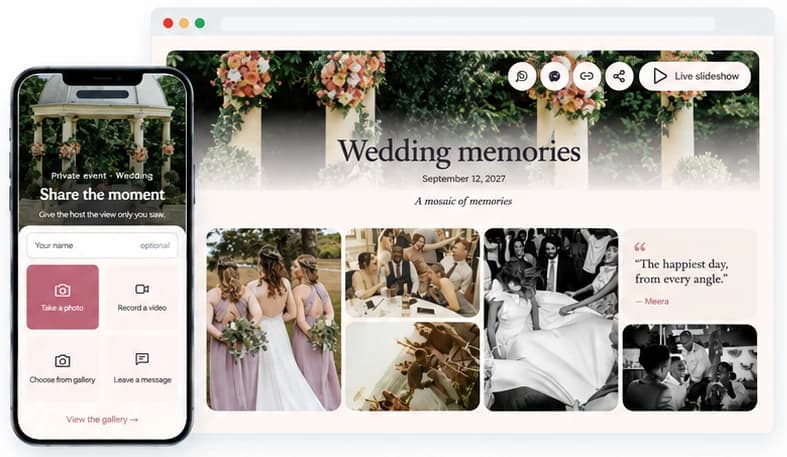

Bring every photo, video, and heartfelt message into one private gallery. Guests simply scan your QR code and share—no app or sign-up needed.
Create your eventStart free. No app required.Make it effortless for everyone to share, from the first photo to the last dance.
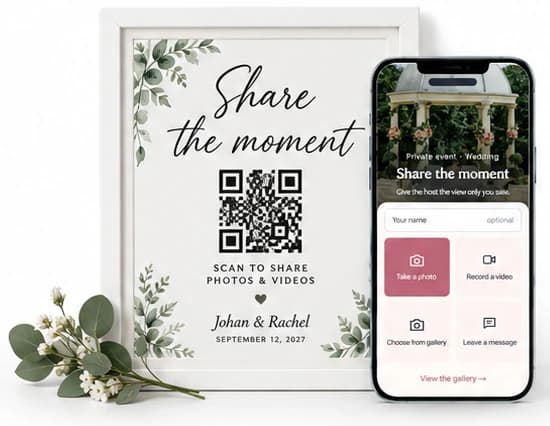
Scan the code and start sharing.
Photos, videos and wishes from everyone.
Just open, upload and enjoy the event.
Relive the day and save your favourites.
Easy for you. Effortless for your guests.
One link or QR code gets everyone in.
See guest photos appear live on a TV or projector.
One simple upload screen for guests. One beautiful gallery for everyone invited.
Emma & James
September 12, 2026
A mosaic of memories


Choose a style to see your upload page and gallery change
72 possible combinations of themes and layouts
Create your own eventOne private gallery, ready in minutes for whatever you’re celebrating.
Make sharing effortless for your guests, and keep every memory together in one private gallery.
 CameraRollShare
We’re here to help hosts bring their guests’ photos together and make every event more memorable.
“We put one QR code on the welcome sign and the table cards. Guests didn’t need an app or an account, photos and videos kept arriving all night, and their little messages became our guestbook PDF.”
“I shared the link in our family chat and everyone joined in, no app and no sign-up. Photos from relatives kept coming in over the following days, and I downloaded them all in original quality.”
“We put the live slideshow on the TV and new uploads showed up in about 15 seconds, with the QR code in the corner so more guests joined in. I hid a couple of blurry shots straight away.”
Create your event, personalise your gallery, and share its QR code or link. Guests can add photos, videos, and messages straight from their browser, bringing everyone’s memories together in one place.
No. Guests simply scan your QR code or open your event link. There’s nothing to install and no account to create.
Yes. Place it on invitations, table cards, welcome signs, or around your venue. You can also send the event link through WhatsApp, email, or a group chat.
Your gallery isn’t publicly listed. Access is through your event’s guest link or QR code, so share it only with people you want to invite. Anyone it’s forwarded to may also be able to access the event.
Yes. You can export your event’s photos and videos as a ZIP file from your dashboard. Written messages can also be exported as a guestbook PDF.
Yes. Open the live slideshow and display it on a screen connected to your device. It’s a simple way to bring your guests’ contributions into the celebration.
You stay in control. Use your dashboard to review contributions and hide anything you don’t want guests to see. Hidden contributions can be restored later.
Yes. The Free Trial includes one event and up to 50 photos, videos, or messages. Paid plans offer higher contribution limits and longer storage periods, with a one-time payment per event.
After you close your event, memories are kept for 14 days on Free Trial, 30 days on Premium, or 60 days on Premium+. Download your files before your storage period ends.
Premium events can be upgraded to Premium+ while they’re in draft or open. Free Trial events stay separate—a paid plan creates a new event, so choose your plan before sharing the final QR code with guests.

Create your private event space, share one link, and let every guest add their view.
Start your event